Case Study
VOID
A black hole for your camera roll.
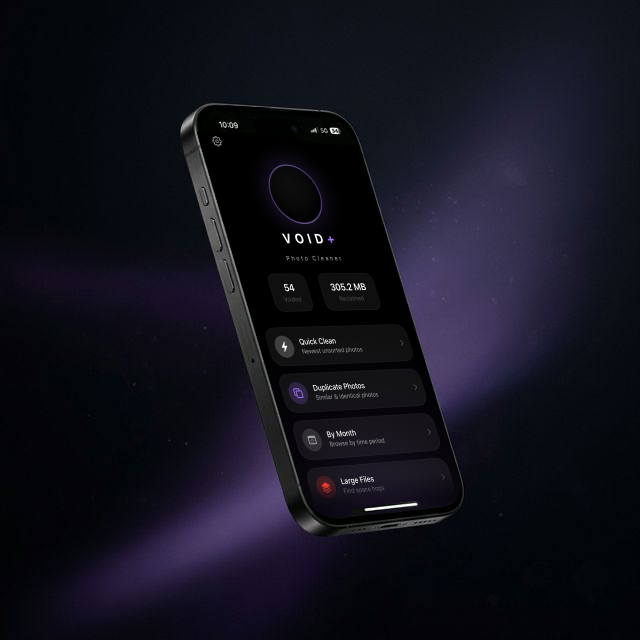
A black hole for your camera roll.
We all have thousands of photos we'll never look at again. Screenshots of addresses. Blurry shots from concerts. Seventeen versions of the same selfie. But cleaning them out? It feels like a chore nobody gets around to.
The built-in Photos app wasn't designed for mass cleanup. Third-party tools either feel invasive (why do you need my photos uploaded?) or make the process so tedious you give up after 40 seconds. We asked a simple question: what if deleting photos felt good?
We didn't just want VOID to work. We wanted it to create a wow moment within the first ten seconds. The kind of reaction that makes someone hand their phone to a friend and say "look at this." That moment is everything. It proves value instantly, builds trust, and turns users into advocates without a single ad.
Most photo apps dump you into settings or a gallery. VOID drops you straight into cleaning mode. Quick Clean surfaces the photos you're most likely to delete (screenshots, blurry shots, near-duplicates) and lets you swipe through them in seconds. The user doesn't have to think about how to use the app. They just start.
VOID groups duplicate and similar photos automatically. Instead of reviewing 2,000 photos one by one, you review 200 groups. We built a local-first image comparison engine that runs entirely on-device. Your photos never leave your phone.
Haptic taps when you swipe. Photos that dissolve with weight. A running counter showing reclaimed storage climbing in real-time. We designed the feedback loop so that cleaning photos doesn't just work, it feels satisfying. Like popping bubble wrap. People keep going not because they have to, but because it feels good.
First-time users see their total photo count, tap Quick Clean, and within seconds they're swiping through photos with haptic feedback, watching their storage counter tick up in real-time. That ten-second window decides everything: whether they keep the app, tell a friend, or leave a review. Every design decision serves that window.
One tap and you're cleaning. Surfaces your most obviously deletable photos first: screenshots, blurry shots, near-duplicates. Most users clear 50+ photos in under a minute.
On-device image hashing finds similar and identical photos. You pick the best one, VOID handles the rest. No more five copies of the same sunset.
Scroll through your library month by month. Perfect for tackling that 2019 holiday folder you've been avoiding for three years.
Find the space hogs. Videos you forgot existed, Live Photos you never play, HDR files quietly eating 12MB each. Sorted by size so the biggest wins come first.
VOID lives in dark mode because that's where photo apps feel at home. The UI disappears into the background so your photos are always the most colourful thing on screen. The purple accent isn't just aesthetic; it's the visual language of the "VOID+" premium features, glowing subtly to indicate power without distraction.
The logo is a black circle with a violet ring. Deliberately simple. It's a void. A black hole. Something that consumes. It tells you what the app does without saying a word.
#0B0A10
#1C1B24
#9B7AE4
#E84057
Apple's photo library access is deliberately restrictive. Getting the permission flow right (explaining why we need access, handling partial permission gracefully, and making the app useful even with limited access) took significant iteration. One wrong dialog and users bounce forever.
Running image comparison across thousands of photos without draining the battery or lagging the UI. We moved all heavy processing to background threads with progressive loading so the app stays buttery smooth while analysis runs silently underneath.
People are afraid of deleting photos. Even bad ones. We had to build trust through reversibility. VOID moves photos to "Recently Deleted" first (Apple's 30-day safety net), shows a clear undo path, and never permanently destroys anything without explicit confirmation.
VOID shipped on the App Store and is live today. From the first concept sketch to a published, polished iOS app. Designed, developed, and launched by Moon Shard.